
Keysight Mobile Meter - Get APK
You'll be able to download in few seconds.
Publisher Description
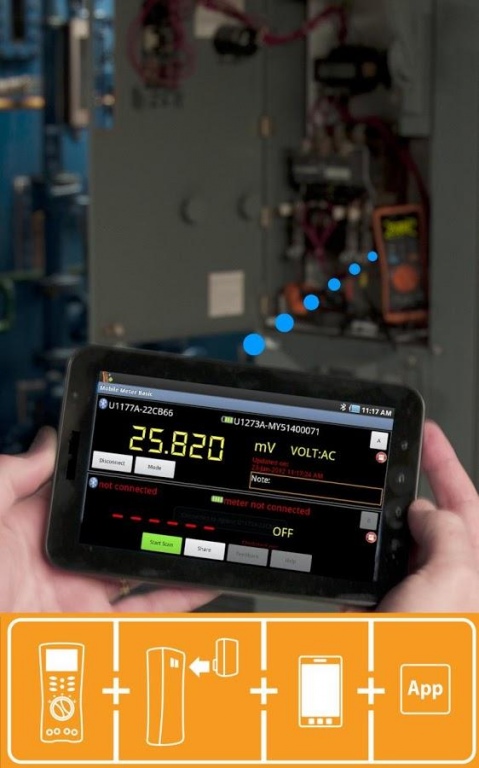
Keysight Technologies Remote Link solution improves your work efficiency and safety. Connect wirelessly to your Keysight U1200 series handheld digital multimeters or clamp meters via Bluetooth® wireless technology. The Keysight Mobile Meter enables you to view measurements from up to three Keysight handheld meters, extending your reach wirelessly to multiple points from a single location. Make measurements from a safe distance and eliminate the need to walk back-and-forth between measured points and control panel during trouble shooting. To further enhance safety during the probing of high-voltage circuits, the Keysight Mobile Meter includes a “voice-out” capability. This feature provides an audible output of your handheld meter readings through the text-to-speech engine in the Android device so that you can concentrate on the measurement task.
Key features:
- Select either one-, two- or three-meter mode to connect with Keysight U1200 series handheld meters.
- Continuously scan measurements for remote monitoring purposes.
- Audible output of DMM readings through Android’s text-to-speech engine.
- Monitor measurements through a Web browser running on a PC or tablet within the same network.
- Assign labels the measurements.
- Identify the connected multimeter(s) with just a press of a button.
- Remotely change the measurement modes of connected multimeters.
- Share your measurements as text or image or both via e-mail or other installed sharing apps such as Facebook, Twitter etc.
For more information, visit www.keysight.com/find/hhgowireless
System Requirements
- Any of the Keysight U1200 series handheld digital multimeters* or clamp meter
- U1117A/U1177A IR-Bluetooth adapter
- Any Android devices with Bluetooth connectivity**
- Android Versions: 2.2, 2.3, 3.1, 3.2, 4.0, 4.1, 4.2***, 4.3, 4.4
Notes:
*U1240 Series requires additional U1179A IR bracket to enable connection with the U1177A Bluetooth adapter.
**Certain devices are able to connect up to two multimeters only (for eg: the Samsung Galaxy S/S2 and HTC Thunderbolt smartphones)
***Android devices’ hardware performance may impact the responsiveness of the Mobile Meter.
The following Android devices are tested and found compatible with Keysight Mobile Meter. However, the devices are not limited to the list below.
Android smartphones:
- Google Nexus One (Android 2.3)
- HTC Sensation Z710e (Android 2.3)
- Samsung Galaxy Nexus (Android 4.1)
- Asus Garmin Phone M10 (Android 2.2)
- Samsung Galaxy Note (Android 4.0)
- Samsung Galaxy S3 (Android 4.0)
- HTC Desire S (Android 2.3, English version)
- Motorola Rarz (Android 4.0)
- Hua Wei Ideos X3 U8510 (Android 2.3)
- Samsung Note 3 (Android 4.4)
- Samsung Galxy 5 (Android 4.4)
Android Tablets:
- Google Nexus 7 (Android 4.2)
- Asus EeePad Transformer (Android 4.0)
- Samsung Galaxy Tab GT-P1010 (Android 2.2)
- Samsung Galaxy Tab 7 Plus, 7.7 (Android 3.1/3.2)
- Samsung Galaxy Tab 2 7” (Android 4.0)
About Keysight Mobile Meter
The company that develops Keysight Mobile Meter is Keysight Technologies Inc.. The latest version released by its developer is 1.0 .
To install Keysight Mobile Meter on your Android device, just click the green Continue To App button above to start the installation process. The app is listed on our website since 2016-04-20 and was downloaded 0 times. We have already checked if the download link is safe, however for your own protection we recommend that you scan the downloaded app with your antivirus. Your antivirus may detect the Keysight Mobile Meter as malware as malware if the download link to com.agilent.mobilemeter is broken.
How to install Keysight Mobile Meter on your Android device:
- Click on the Continue To App button on our website. This will redirect you to Google Play.
- Once the Keysight Mobile Meter is shown in the Google Play listing of your Android device, you can start its download and installation. Tap on the Install button located below the search bar and to the right of the app icon.
- A pop-up window with the permissions required by Keysight Mobile Meter will be shown. Click on Accept to continue the process.
- Keysight Mobile Meter will be downloaded onto your device, displaying a progress. Once the download completes, the installation will start and you'll get a notification after the installation is finished.
Program Details
System requirements
Download information
Pricing
Version History
version Version
posted on 2016-04-20
V2.2.0,This app no longer being supported. Download "Keysight Meter Logger" now.,Keysight Meter Logger improves your productivity and safety by allowing you to stream measurements in real time from up to 3 Keysight handheld digital multimeters and clamp meters wirelessly:,- Real time streaming of measurement data via Bluetooth,- View your continuous and manually logged data in tabular or graphical format,- View Min/Max/Average calculation,- Retrieve and view previously recorded data
version BETA
posted on 2012-11-30
Several fixes and updates
Disclaimer
External Download
We do not host Keysight Mobile Meter on our servers. We did not scan it for viruses, adware, spyware or other type of malware. This app is hosted by Galad and passed their terms and conditions to be listed there. We recommend caution when installing it.
The APK Download link for Keysight Mobile Meter is provided to you by apps112.com without any warranties, representations or guarantees of any kind, so access it at your own risk.
If you have questions regarding this particular app contact the publisher directly. For questions about the functionalities of apps112.com contact us.
